# What are CMD and ENTRYPOINT in Docker?
## Let's Start
When I was writing **Dockerfiles** initially, I found CMD and ENTRYPOINT very confusing to me. I assume there will be folks out there who are still not so sure about these two syntaxes and their use cases.
So let's try to understand the concept in depth for once and all.
---
The best way to understand a tool or technology is to go to their official documentation and start digging.
In our case, you can follow this link of **Docker Official Documentation** - https://docs.docker.com/engine/reference/builder/#entrypoint
This is what you will see :
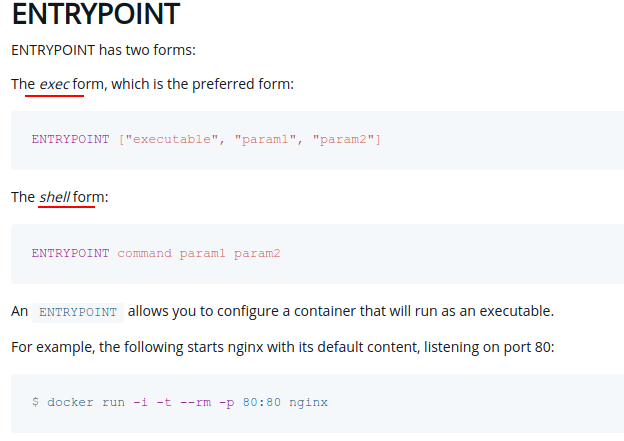 But did you notice the terms - `exec form` and `shell form`?
---
## Exec and Shell form
### What is exec form?
In this form, you have to pass the executable and all required params as JSON Array.
The exec form makes it possible to avoid *shell string munging* and to `RUN` commands using a base image *that does not contain the specified shell executable*.
Note that as it is a JSON array, make sure you use double quotes, not single quotes.
Example :
```
ENTRYPOINT ["/usr/sbin/apache2ctl", "-D", "FOREGROUND"]
```
Here
* We are avoiding any shell parsing and directly using the executable which is `apache2ctl`
* We are not invoking any shell to run the binary of our program.
**This form is recommended over `shell form`** as shell form can cause troubles which make our application inside the container not receive signals properly.
**Special Case** - In exec form, docker can substitute env variable if set by `ENV` instruction in `Dockerfile`.
```
FROM alpine:latest
ENV VERSION=v1.2.0
RUN ["echo", "$VERSION"]
```
This will echo **v1.2.0** as docker does the substitution for us.
### What is shell form?
This is a fairly simple form which we can use, as We don't have to follow any special notation - we just have to write exactly as we run commands on our terminals with shell in our day-to-day life.
Example:
```
ENTRYPOINT apache2ctl -D FOREGROUND
```
Here
* Shell Processing and Environment Variable parsing can happen.
* Our binary is not executed directly, first, a shell is invoked with `/bin/sh -c` and then our executable is started in that shell.
* You can use a \ (backslash) to continue a single RUN instruction onto the next line.
* The `SHELL` instruction allows the default shell (`/bin/sh`) used for the shell form of commands to be overridden.
### Difference/Comparison
**Basic comparison from [the documentation](https://docs.docker.com/engine/reference/builder/#run) :**
Unlike the shell form, the exec form does not invoke a command shell. This means that normal shell processing does not happen. For example, `RUN [ "echo", "$HOME" ]` will not do variable substitution on `$HOME`. If you want shell processing then either use the shell form or execute a shell directly, for example: `RUN [ "sh", "-c", "echo $HOME"]`
### When to Use?
#### Exec Form
1. When You don't want any shell features like env var substitution, I/O Redirection, piping, chaining multiple commands, etc.
2. When You want to forward process signals to child processes. Ex - Pressing **Ctrl + C**(SIGINT) to stop the process.
3. Recommended for CMD & ENTRYPOINT in Dockerfile.
#### Shell Form
1. When you want to use shell features as mentioned above. (Piping, Command chaining using a backslash, I/O Redirection, Shell Variables substitution, etc. )
2. It is extremely useful with `RUN` instructions in Dockerfile.
---
As we cleared some basic concepts, Now, Back to the original question: **CMD vs ENTRYPOINT**?
## CMD
- It sets the default parameter for a container.
- It can be overridden easily while running a container with the `docker run` command.
- If you don't provide any executable in the `CMD`, it will pass itself as the parameter
to the `entrypoint`.
## ENTRYPOINT
- When you want to use your container as executable. Example - See below `Dockerfile`
```
FROM alpine
ENTRYPOINT ["echo", "Hello"]
CMD ["World!"]
```
**See in Terminal:** (running above Docker Image)


*Here you can see that I am passing some parameters and My container is behaving according to that!*
- By implementing `ENTRYPOINT`, we are implicitly specifying that this container is made for some specific use case.
- When we run the container with `docker run`, all the params are appended to `ENTRYPOINT`
---
## How to Use CMD/ENTRYPOINT with :
### `docker run` command
#### CMD
```
docker run -it param1
```
Here param1 is equivalent to CMD instruction.
#### ENTRYPOINT
```
docker run -it --entrypoint /path/of/entrypoint/executable param1
```
Here we are specifying some other entrypoint executable.
### docker-compose
```
version: '3'
services:
web:
image : repo/my-web-server:v2
entrypoint: ["python3", "manage.py"]
command: ["runserver"]
ports:
- "8000:8000"
```
### Kubernetes
```
apiVersion: v1
kind: Pod
metadata:
name: command-demo
labels:
purpose: demonstrate-command
spec:
containers:
- name: command-demo-container
image: debian
command: ["printenv"]
args: ["HOSTNAME", "KUBERNETES_PORT"]
restartPolicy: OnFailure
```
Here `command` corresponds to `ENTRYPOINT` & `args` corresponds to `CMD` in Dockerfile.
---
This is how I feel when I am comfortable with these small concepts with additional knowledge ;)
But did you notice the terms - `exec form` and `shell form`?
---
## Exec and Shell form
### What is exec form?
In this form, you have to pass the executable and all required params as JSON Array.
The exec form makes it possible to avoid *shell string munging* and to `RUN` commands using a base image *that does not contain the specified shell executable*.
Note that as it is a JSON array, make sure you use double quotes, not single quotes.
Example :
```
ENTRYPOINT ["/usr/sbin/apache2ctl", "-D", "FOREGROUND"]
```
Here
* We are avoiding any shell parsing and directly using the executable which is `apache2ctl`
* We are not invoking any shell to run the binary of our program.
**This form is recommended over `shell form`** as shell form can cause troubles which make our application inside the container not receive signals properly.
**Special Case** - In exec form, docker can substitute env variable if set by `ENV` instruction in `Dockerfile`.
```
FROM alpine:latest
ENV VERSION=v1.2.0
RUN ["echo", "$VERSION"]
```
This will echo **v1.2.0** as docker does the substitution for us.
### What is shell form?
This is a fairly simple form which we can use, as We don't have to follow any special notation - we just have to write exactly as we run commands on our terminals with shell in our day-to-day life.
Example:
```
ENTRYPOINT apache2ctl -D FOREGROUND
```
Here
* Shell Processing and Environment Variable parsing can happen.
* Our binary is not executed directly, first, a shell is invoked with `/bin/sh -c` and then our executable is started in that shell.
* You can use a \ (backslash) to continue a single RUN instruction onto the next line.
* The `SHELL` instruction allows the default shell (`/bin/sh`) used for the shell form of commands to be overridden.
### Difference/Comparison
**Basic comparison from [the documentation](https://docs.docker.com/engine/reference/builder/#run) :**
Unlike the shell form, the exec form does not invoke a command shell. This means that normal shell processing does not happen. For example, `RUN [ "echo", "$HOME" ]` will not do variable substitution on `$HOME`. If you want shell processing then either use the shell form or execute a shell directly, for example: `RUN [ "sh", "-c", "echo $HOME"]`
### When to Use?
#### Exec Form
1. When You don't want any shell features like env var substitution, I/O Redirection, piping, chaining multiple commands, etc.
2. When You want to forward process signals to child processes. Ex - Pressing **Ctrl + C**(SIGINT) to stop the process.
3. Recommended for CMD & ENTRYPOINT in Dockerfile.
#### Shell Form
1. When you want to use shell features as mentioned above. (Piping, Command chaining using a backslash, I/O Redirection, Shell Variables substitution, etc. )
2. It is extremely useful with `RUN` instructions in Dockerfile.
---
As we cleared some basic concepts, Now, Back to the original question: **CMD vs ENTRYPOINT**?
## CMD
- It sets the default parameter for a container.
- It can be overridden easily while running a container with the `docker run` command.
- If you don't provide any executable in the `CMD`, it will pass itself as the parameter
to the `entrypoint`.
## ENTRYPOINT
- When you want to use your container as executable. Example - See below `Dockerfile`
```
FROM alpine
ENTRYPOINT ["echo", "Hello"]
CMD ["World!"]
```
**See in Terminal:** (running above Docker Image)


*Here you can see that I am passing some parameters and My container is behaving according to that!*
- By implementing `ENTRYPOINT`, we are implicitly specifying that this container is made for some specific use case.
- When we run the container with `docker run`, all the params are appended to `ENTRYPOINT`
---
## How to Use CMD/ENTRYPOINT with :
### `docker run` command
#### CMD
```
docker run -it param1
```
Here param1 is equivalent to CMD instruction.
#### ENTRYPOINT
```
docker run -it --entrypoint /path/of/entrypoint/executable param1
```
Here we are specifying some other entrypoint executable.
### docker-compose
```
version: '3'
services:
web:
image : repo/my-web-server:v2
entrypoint: ["python3", "manage.py"]
command: ["runserver"]
ports:
- "8000:8000"
```
### Kubernetes
```
apiVersion: v1
kind: Pod
metadata:
name: command-demo
labels:
purpose: demonstrate-command
spec:
containers:
- name: command-demo-container
image: debian
command: ["printenv"]
args: ["HOSTNAME", "KUBERNETES_PORT"]
restartPolicy: OnFailure
```
Here `command` corresponds to `ENTRYPOINT` & `args` corresponds to `CMD` in Dockerfile.
---
This is how I feel when I am comfortable with these small concepts with additional knowledge ;)
 ---
## Related Articles
1. https://docs.docker.com/engine/reference/builder/#run
2. https://docs.docker.com/engine/reference/builder/#entrypoint
3. https://hynek.me/articles/docker-signals/
4. https://kubernetes.io/docs/tasks/inject-data-application/define-command-argument-container/
---
Thanks for reading! Hope it adds something to your knowledge base.
Let me know if you have any feedback. 🙏
\- Kratik
---
## Related Articles
1. https://docs.docker.com/engine/reference/builder/#run
2. https://docs.docker.com/engine/reference/builder/#entrypoint
3. https://hynek.me/articles/docker-signals/
4. https://kubernetes.io/docs/tasks/inject-data-application/define-command-argument-container/
---
Thanks for reading! Hope it adds something to your knowledge base.
Let me know if you have any feedback. 🙏
\- Kratik